Foxname Script is a keyless script hub for Steal an Egg that goes beyond basic egg-stealing automation. Along with Auto Steal Egg, it includes tools for character protection, upgrades, reward collection, movement, trail purchases, and automatic use of the fuse machine.
The interface is divided into four tabs: Main, Misc, Local, and Features. Foxname is reported to support both PC and mobile devices. The information on this page was checked on September 4, 2026.
Quick overview: Foxname combines automated stealing with several progression features that are not commonly grouped together in one hub. Its standout tools include automatic fuse-machine use, base and treadmill upgrades, index reward collection, and offline earnings. Feature availability can change between releases and may also depend on the executor being used.
What Is the Foxname Script?
Many Steal an Egg script hubs focus mainly on automating egg collection. Foxname Script takes a broader approach by adding tools that handle several tasks before, during, and after a stealing run.
For example, the hub can automatically upgrade your base and treadmill, claim index rewards, collect offline earnings, and manage the fuse machine. Each of these functions has its own setting, giving you more control over which parts of the game are automated.
The fuse system is one of Foxname’s more distinctive features. You can limit which rarities are used, set a maximum scale, choose how frequently the machine runs, or trigger a fuse manually.
The trade-off is a more spread-out interface. Important options are divided between four tabs, so configuring only the first screen means you may miss several useful controls.
Keep in mind that script hubs can change after game updates. A feature shown here may stop working or behave differently in a newer release.
Foxname, Roblox Script (No Key)
Working · No Key · PC · Mobile
Important: Foxname does not place every major option under Main. Fuse settings are found in Local, while Speed, TPWalk, Fly, and Fly Speed are located under Features.
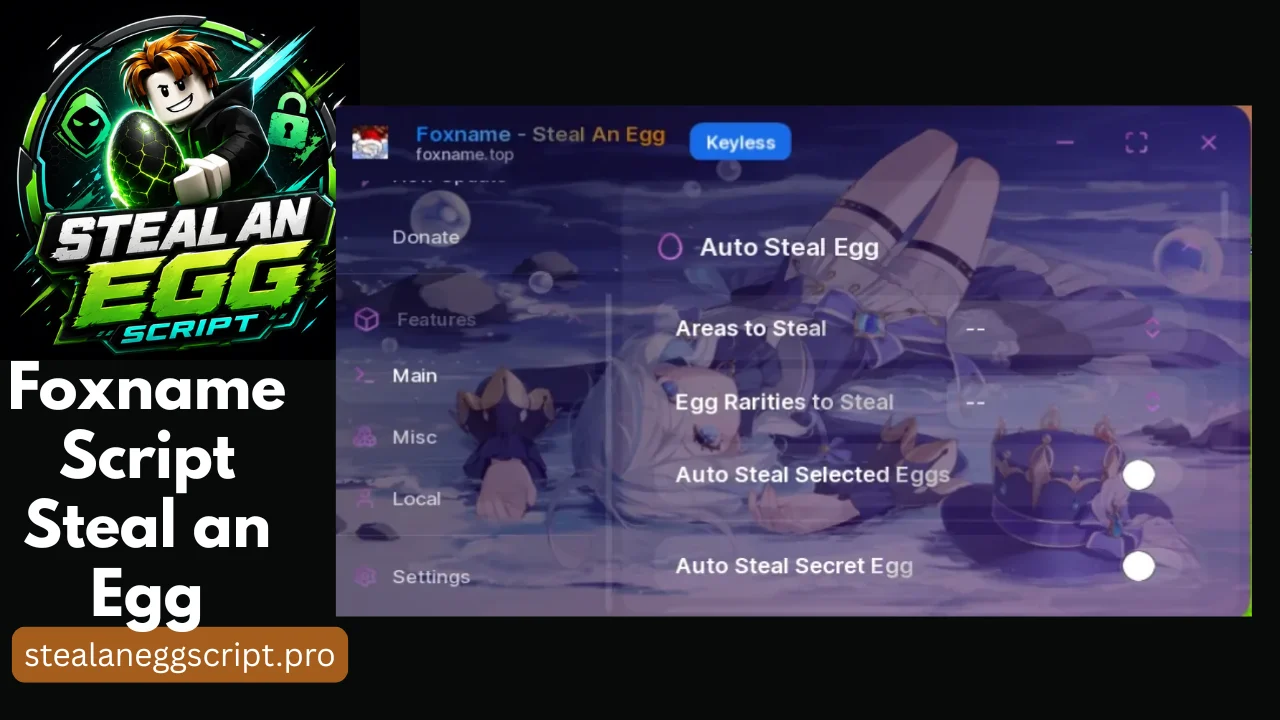
The Main tab controls automated stealing. Choose the areas and egg rarities you want the script to target before turning on the related Auto Steal options.
Auto Steal Egg · Areas to Steal · Egg Rarities to Steal · Auto Steal Selected Eggs · Auto Steal Secret Egg · Godmode · Anti Trap
Lua Script
loadstring(game:HttpGet("https://raw.githubusercontent.com/caomod2077/Script/refs/heads/main/Fn-stealanegg.lua"))()Foxname Tabs and Recommended Settings
Foxname Script separates its tools into four sections. Understanding what each tab controls makes the hub much easier to configure.
Main Tab
The Main tab contains the primary stealing controls. Auto Steal Egg appears near the top, followed by dropdown menus for Areas to Steal and Egg Rarities to Steal.
Configure these two dropdowns before enabling Auto Steal. They initially display two dashes until you make a selection. Setting the filters first gives you better control over which areas and eggs the script targets.
Two additional options appear below them:
- Auto Steal Selected Eggs targets eggs based on your chosen selections.
- Auto Steal Secret Egg focuses specifically on secret eggs.
If your goal is to target higher-value secret eggs rather than collect as many eggs as possible, the Secret Egg option is the more relevant setting.
Misc Tab
The Misc section combines defensive tools with progression automation.
Godmode, Anti Trap, and Anti Ragdoll are intended to reduce interruptions while the script is running. Anti Ragdoll can be particularly useful when carrying an egg because being knocked down can interrupt the attempt.
This tab also includes Auto Upgrade Base and Auto Upgrade Treadmill. These options automatically use available money for upgrades.
That convenience can work against you if you are saving currency for something else. Leave the upgrade options disabled when you want to control your spending manually.
Foxname also provides Auto Claim Index Rewards and Auto Offline Earnings. These options automate reward collection rather than changing movement or stealing behavior.
Local Tab
The Local tab contains Foxname’s fuse-machine controls.
Available fuse settings include:
- Fuse Rarities – limits which egg rarities can be used.
- Fuse Max Scale – sets the maximum size allowed for fusing.
- Fuse Interval – controls how frequently the automated fuse process runs.
- Fuse Now – starts a single fuse cycle manually.
Set Fuse Rarities before turning on automatic fusing. This helps prevent the machine from using eggs that you intended to keep.
The Local tab also contains Trails to Buy and Auto Buy Trail. These options handle trail purchases automatically. Leave them disabled if you do not want the script spending currency on trails.
Features Tab
Movement-related controls are grouped under Features.
This section includes:
- Speed
- TPWalk
- Fly
- Fly Speed
Speed and flight settings change how quickly your character moves, while TPWalk uses step-like movement instead of normal walking.
Extreme movement settings can make unusual behavior more noticeable to other players. If you use these controls, avoid making large changes immediately.
Recommended Setup Order
For a cleaner setup, configure the hub in this order:
- Select Areas to Steal on Main.
- Choose Egg Rarities to Steal.
- Open Local and configure Fuse Rarities.
- Choose the Misc automation options you actually want.
- Adjust movement settings only if needed.
This approach sets the important filters before the automated actions begin.
How to Run the Foxname Script
- Launch Roblox and enter Steal an Egg.
- Wait until the map, your plot, and other important game elements have fully loaded.
- Open a compatible script executor and connect it to the game.
- Copy the current Foxname Script loadstring shown above.
- Paste the script into the executor and run it.
- Wait for the Foxname interface to appear.
- Open Main and configure Areas to Steal and Egg Rarities to Steal.
- Go to Local and set Fuse Rarities before using automatic fusing.
- Enable Auto Steal Egg and allow it to complete a full cycle before changing several other settings at once.
If you are unsure which executor is suitable for your device, see the executor guide, which covers PC, Android, and iOS options.
Is the Foxname Script Safe?
Using a third-party Roblox script comes with risks, so no script hub should be treated as completely safe simply because it does not require a key.
Consider the following before running Foxname:
- Account action is possible. Third-party scripts can violate platform or game rules, so using them may put the account at risk.
- Never provide login credentials. A script or download page should not need your Roblox password, authentication cookies, or account recovery codes.
- Configure Fuse Rarities carefully. Automatic fusing may use eggs you wanted to keep if the filter is not set correctly.
- Watch automatic spending. Auto Upgrade Base and Auto Upgrade Treadmill can use your available currency without waiting for manual confirmation.
- Keyless only describes access. A script being keyless means you do not have to complete a key system before using its interface. It does not prove that the script itself is safe.
- Remote code can change. The loadstring retrieves code from a remotely hosted file. The contents of that file can be updated even when the loadstring itself stays the same.
Because scripts and game updates change over time, review what you are running rather than assuming an older version behaves exactly like the current one.
What to Do If Foxname Does Not Load
Start by copying the current loadstring again instead of using one saved from an old article, message, or video.
If that does not help, rejoin Steal an Egg and wait until your plot, pets, and other game elements are fully visible before running the script.
When the Foxname interface appears but its buttons or toggles no longer perform their expected actions, a game update may have broken compatibility with the current script release. In that situation, you may need to wait for an updated version or use another compatible hub.
Frequently Asked Questions
Does the Foxname script require a key?
No. Foxname is listed as a keyless Steal an Egg script, so there is no key system that must be completed before accessing the hub.
What makes Foxname different from other Steal an Egg scripts?
Its broader automation tools are the main difference. In addition to stealing eggs, Foxname Script includes controls for the fuse machine, base upgrades, treadmill upgrades, index rewards, offline earnings, movement, and trail purchases.
Why do the Main tab dropdowns show two dashes?
The two dashes indicate that you have not selected an option yet. Choose your preferred Areas to Steal and Egg Rarities to Steal before enabling Auto Steal.
What is the difference between Auto Steal Selected Eggs and Auto Steal Secret Egg?
Auto Steal Selected Eggs works with the eggs you choose through the available selection controls. Auto Steal Secret Egg specifically targets secret eggs.
Does Godmode protect an account from moderation?
No. Godmode is an in-game character-related feature. It does not protect your Roblox account from moderation or other consequences associated with third-party script use.
Does Foxname Script work on mobile?
Foxname is reported to support both PC and mobile. Actual compatibility can still depend on the current script version and the executor used on the device.
The script ran, but the Foxname menu did not appear. What should I check?
Make sure the game has fully loaded and that you copied the latest loadstring. Rejoining the server and executing the script again after your plot and other game elements appear may also help.
If the problem continues, the script may no longer be compatible with the current game version or your execution environment.
Is the Foxname Script No Key feature list permanent?
No. Script features can be added, removed, renamed, or broken by future updates. Treat the feature list on this page as information about the currently documented release rather than a permanent specification.